


Adult Block: Porn Blocker
3.8348.00 Reviews
App Specs
- Version
- Rocket 1.0.1r
- Updated On
- License
- Free
- Downloads
- 5,000,000+
- Developer
- Mvsweb LLP
- Categories
- Parenting
- Platform
- Android
Screenshots
 Analysis by AppCompare
I find that a useful content filter begins with a clear household rule, not just an install. Adult Block: Porn Blocker is a parenting app from Mvsweb LLP, built for people who want to limit adult material on a phone and make that boundary easier to maintain. I’d think of it as one part of a family’s device routine: it can help with filtering, but it works best when the parent and child also agree on what the rules are and what to do when a page is blocked.
Start with the device and the goal
Before setting it up, I’d decide whether the phone is mainly for a child, shared among family members, or an adult’s own device. Those situations call for different expectations. On a child’s phone, the aim may be to reduce accidental exposure while leaving ordinary browsing usable. On a personal device, the goal might instead be to add friction when you’re trying to avoid certain material. Being clear about that goal makes it easier to judge whether the filter is behaving sensibly rather than treating every blocked page as a failure.
The app is free to install, has an Everyone content rating, and includes optional in-app purchases priced from $1.49 to $29.99 per item. I’d check the purchase choices before relying on a paid option, and make sure the person responsible for the device understands what is free and what may cost extra. The app has a 3.8 average from around 11,000 ratings, so I would approach it as a practical tool worth testing on your own device, not as a guarantee that every family will have the same experience.
Set it up, then test the boundary
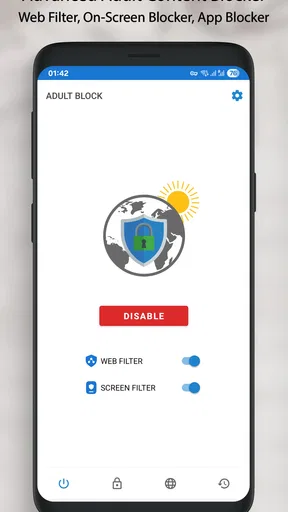
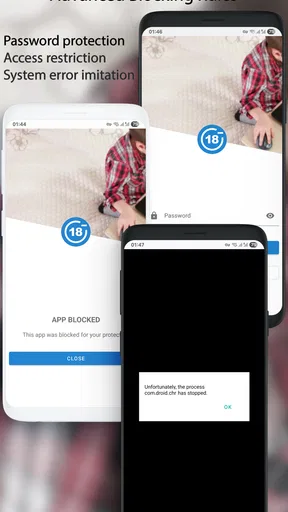
Getting started is intended to be simple, but I wouldn’t stop at installation. I’d open the settings with the device owner, review the available controls, and set the passcode if the adult needs to keep the rules from being changed casually. Then I’d try a few normal browsing tasks: open a familiar site, use a search, and launch the apps that the child or adult actually needs. This small test helps reveal whether the chosen level of blocking fits daily use before the phone becomes a source of surprises.
That test matters because filtering is never just about blocking a category in the abstract. A useful setup should make the unwanted route harder to take without disrupting school research, ordinary news, or a parent’s ability to use the phone. If a legitimate page is caught, I’d treat that as a cue to review the settings and the household rule together. The passcode can protect the settings from quick changes, but it shouldn’t replace a conversation about why the boundary exists.
What the handoff looks like at home
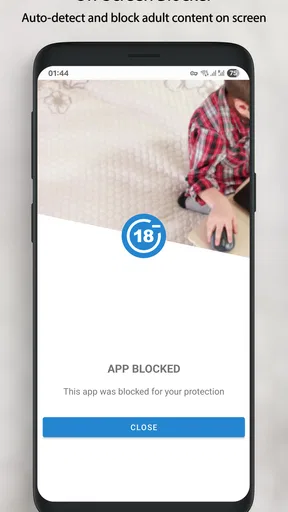
A realistic example is a child borrowing a parent’s phone to watch a video or play a game while dinner is being prepared. The parent can set the filter and keep the settings protected, then hand over the device with a straightforward explanation: some pages and apps are restricted, and a blocked screen is a reason to ask for help rather than look for a workaround. That turns the app into a support for a rule the family has already discussed, rather than a silent substitute for supervision.
For a teenager with their own device, I’d take a different approach. I would explain what the filter is meant to catch, invite them to flag a page that seems incorrectly blocked, and review any adjustment myself. That handoff can reduce frustration and make the limits more understandable. It also recognizes a real trade-off: a passcode helps keep settings in place, but strict control without trust can make a young person less likely to ask for help when something disturbing appears.
Worth Reading Before You Choose

Flipboard Shows What News Apps Must Do Beyond the Feed

Switching to Android Auto Means Rethinking Your Driving Routine

Google Calendar Makes a Crowded Week Easier to Manage

Ludo King Makes the Most of the Minutes Between Plans

Baby Panda World Brings Quick Play to Modern Phones, but Its Game Library Feels Busy

ESPN’s Live Game View Makes Following Close Games Easier
How Adult Block Fits a Real Routine
I’d treat a filter as one step in a household routine, not the whole plan. Before handing over a phone, I’d decide who is responsible for setting the boundary, what the child should do if a page is blocked, and how to handle a legitimate exception. That makes the next part—the everyday handoff—clearer and less likely to turn a routine device loan into a dispute.
Where it helps—and where it can frustrate
Adult Block is most appealing when you want a focused layer for blocking adult websites and apps rather than a broad family dashboard. The store description also presents it as a way to block porn, apps, and sites, so the central task is clear: restrict access on the device. That focus may suit a parent who wants a direct control or an adult who wants a simple barrier. It is less suited to families looking for a complete system for screen-time schedules, location checks, detailed activity reports, or managing several children from one place.
I’d also avoid treating any filter as a promise that nothing unsuitable can ever appear. Blocking tools can make access less direct, but a phone is used through different apps and browsing paths, and a child may encounter material in ways a parent did not expect. For that reason, I see the app as a useful layer, not a replacement for age-appropriate guidance, device settings, or an adult’s involvement. If the main concern is time spent on games or bedtime use, a screen-time control is likely a better match than an adult-content blocker.
A small workflow that makes the filter more useful
One practical tip is to do a brief check after changing any setting: try the everyday sites and apps the device needs, then leave the phone with its intended user and ask them to report confusing blocks. This gives you a chance to catch friction early, before a homework search or an ordinary task turns into an argument. I’d keep those checks calm and specific; the aim is to confirm that the boundary works, not to inspect someone’s private browsing as a routine.
Another useful habit is to keep the passcode with the responsible adult and agree in advance how exceptions will be handled. If a school assignment or family task requires a blocked page, the child can ask for help rather than repeatedly changing settings. For an adult using the app to support a personal goal, the same idea applies: make a deliberate plan for legitimate exceptions so the tool adds helpful friction without making ordinary use unnecessarily difficult. This is a small workflow choice, but it can make the difference between a filter that feels manageable and one that is quickly abandoned.
Who should choose it
I’d consider Adult Block if you want a focused blocker, are comfortable checking its behavior on the actual device, and can pair it with clear household expectations. It may also suit someone who wants a passcode-protected barrier on their own phone. I’d look elsewhere if you need a broad parental-control suite, if several devices must be managed together, or if your priority is setting daily time limits rather than filtering adult content. Those needs call for a different kind of tool, and adding a narrowly focused blocker may only create more settings to manage.
The app was released on December 1, 2018, and its current version is Rocket 1.0.1r, with Android 6.0 as the minimum operating-system requirement. It has passed five million installs, which gives it a substantial user base, though that alone can’t tell you how it will work with your particular phone, browser, or family rules. I’d install it, run the everyday checks, and decide based on whether the boundaries it offers fit the way the device is actually used.
Ever found yourself scrolling through your phone wondering if there's a way to keep your browsing clean and distraction-free? Well, let me introduce you to Adult Block: Porn Blocker. This app is a game changer for anyone wanting to ensure their online experience stays wholesome. I’ve been tinkering with it and here’s what I found.
Getting Started with Adult Block
Diving into the app, the first thing I noticed was how straightforward the setup process is. You don’t need to be a tech wizard to get this running. Simply download the app from your favorite app store, and you’re on your way. The interface is intuitive, making navigation a breeze even for those who aren't tech-savvy. It’s designed to start blocking unwanted content right out of the box, which is a huge plus!
Features That Stand Out
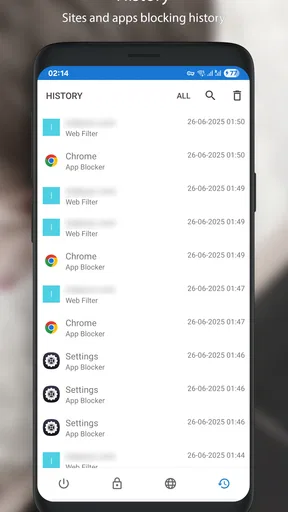
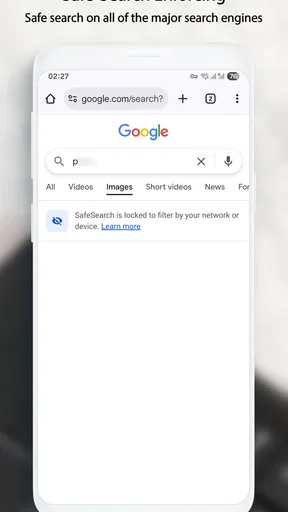
One of the standout features of Adult Block: Porn Blocker is its ability to automatically block content without constant tinkering. The app runs quietly in the background, ensuring that inappropriate content is filtered out effectively. It even allows for customization, so you can tweak settings based on your specific needs.
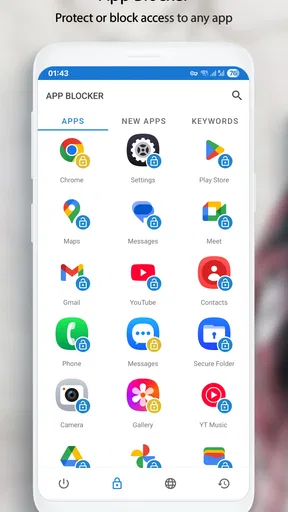
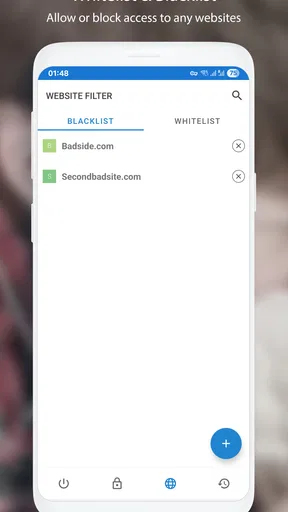
The app also offers a passcode feature that adds an extra layer of security. This means only you can change the settings, keeping your browsing preferences private. Plus, there’s the option to block particular websites and apps, giving you more control over what’s accessible on your device.
Real-Life Application
In practical terms, using Adult Block is like having a digital bouncer for your phone. It’s perfect for parents wanting to safeguard their kids’ devices or even for adults who’d like to curb distractions. During my time using it, I found that it seamlessly integrated with my daily browsing, without affecting the performance of my phone. It’s lightweight and doesn’t hog memory, which is always a win in my book.
Why You Might Need It
We live in a world where unwanted content can pop up at the most inconvenient times. Having an app like this ensures you’re not caught off guard. Whether you’re at work, or your kids have your phone for a game, Adult Block: Porn Blocker keeps everything in check.
The peace of mind it offers is invaluable. No more worrying about accidental clicks or inappropriate ads showing up. It’s like having a digital peacekeeper that ensures your online environment remains as you’d like it.
Wrapping Up My Experience
After spending some time with Adult Block: Porn Blocker, I can confidently say it’s a must-have for anyone looking to maintain a clean and safe browsing experience. It’s efficient, easy to use, and most importantly, effective. If you’re in the market for a reliable content blocker, this should definitely be on your radar.
Considering all these aspects, it’s clear that having such a tool in your digital arsenal is not just smart but essential. So, why wait? Give it a try and experience the difference for yourself. You’ll wonder how you ever managed without it!
Pros
- Effective blocking of adult content.
- User-friendly interface with easy setup.
- Customizable filters for specific sites.
- Works across multiple browsers and apps.
- Regular updates for improved security.
Cons
- Requires payment for premium features.
- Limited free version capabilities.
- Occasional false positives in filtering.
- Cannot block all encrypted sites.
- May slow down device performance.
FAQs for Adult Block: Porn Blocker
How does Adult Block: Porn Blocker work to filter content?
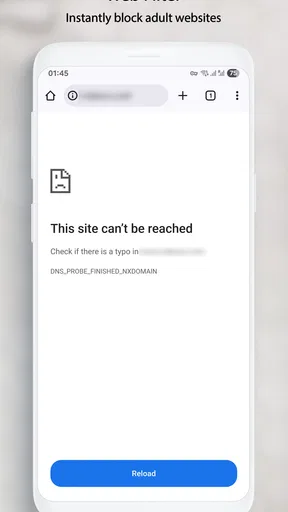
Adult Block: Porn Blocker uses advanced algorithms and a comprehensive database of known adult sites to effectively block inappropriate content. When you attempt to access a site, the app checks it against its database. If it matches, access is denied, ensuring a safer browsing experience for users.
Is Adult Block: Porn Blocker customizable for different users?
Yes, Adult Block: Porn Blocker offers customizable settings to fit the needs of different users. You can create specific profiles or adjust filtering levels, allowing parents to tailor the app’s features according to the age and maturity level of their children. This flexibility ensures appropriate content access for everyone.
Does Adult Block: Porn Blocker affect overall device performance?
The app is designed to operate efficiently without significantly impacting device performance. It runs quietly in the background and uses minimal resources. Users generally report no noticeable slowdowns, allowing for seamless browsing and app usage while maintaining protection against undesirable content.
Can Adult Block: Porn Blocker be easily bypassed?
Adult Block: Porn Blocker is built with security in mind, making it difficult to bypass. However, it is important to keep the app updated to ensure it covers new sites and methods of accessing adult content. For additional security, setting a strong password for the app’s settings is recommended.
What platforms is Adult Block: Porn Blocker available on?
Adult Block: Porn Blocker is available for both Android and iOS devices. It provides comprehensive support across these platforms, offering a consistent experience regardless of the device used. Users can download it through the Google Play Store or the Apple App Store, making it accessible for a wide range of users.


